







Code at blazing speed. Turn ideas into reality.

Blazing-fast, Rust Engine Code editor with Multi AI-Integration

Free · Windows 10 and 11, 64‑bit · 144 MB

Multi-agent, one prompt.

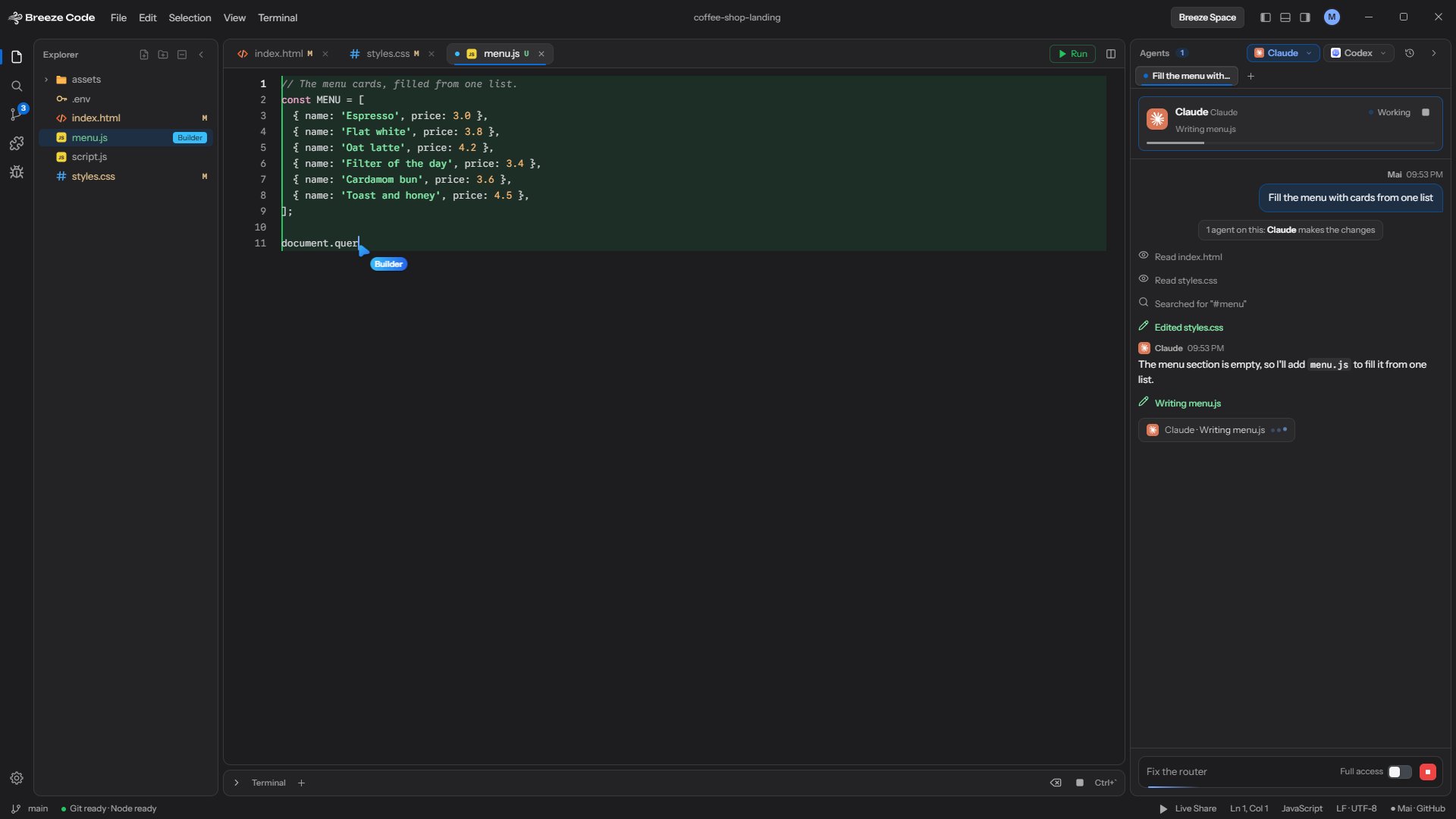
Why stop at one AI? @mention Claude Code, Codex and Antigravity in the same prompt and they split the work, even though they come from different companies.

Each agent calls dibs on the files it needs. If two want the same one, you pick who gets it, then they build side by side. You see every read, edit and command live in one chat, with a name on each. If an agent wanders into someone else's file, Breeze puts it back and gives you a heads-up.

Got questions? Check the FAQ

Press F5. Your site, live and editable.

Breeze Code opens your web page right beside the code. Point at anything to see its box, fix text right on the page, or jump straight to the line that made it. Try it below.

  • See every box. Turn on inspect and each element gets an outline with its tag, classes and size.
  • Edit on the page. Right-click, pick Edit Manually and type. Enter writes it into your file.
  • Show in Source. Jump the editor to the exact line, or hand the element to an agent with Ask AI.
index.html
    localhost:5500/index.html Not running

    Press F5 to preview index.html

    Breeze Code vs. Typical Code Editor

    Side by side with Cursor, Windsurf and VS Code with GitHub Copilot.

    Topic Breeze Code Typical AI editors
    Price Free. No plans, no credits. You only pay if you pick a paid agent. Free tier, then a monthly plan. Agents eat credits or quotas.
    Which AI Claude Code, Codex, Antigravity or a local model. Swap anytime. Mostly whatever the editor offers.
    Local models Ollama, LM Studio or any OpenAI-compatible server. Zero cloud. Cloud-first. Local support varies.
    While it works Every read, edit and command shows up live, tagged with who did it. Depends on the editor and mode.
    Several agents @mention agents from different companies and split one task between them. Some run agents in parallel, usually from one provider.
    Platforms Windows only (for now). Windows, macOS and Linux.

    Checked October 2026. These change fast, so peek at their sites for current plans.

    • Python
    • C
    • C++
    • C#
    • Java
    • Rust
    • JavaScript
    • TypeScript
    • HTML
    • CSS
    • React
    • Vue
    • Svelte
    • Astro
    • Node.js
    • Sass
    • JSON
    • Markdown

    From one prompt to a merged PR.

    Pick your agents, split the work, then review and ship, all in one window.

    02 · Split the work

    Several agents, one prompt

    @mention agents from different companies. Each one claims its files, they build at the same time, and Breeze undoes any edit to a file an agent didn’t claim.

    01 · Pick your agents

    Any agent you like

    Claude Code, Codex, Antigravity, or a local model through Ollama or LM Studio.

    03 · Scale up

    Agent board

    Up to 8 chats side by side, each with its own model and effort, all running at once.

    The editor with menu.js open while Claude writes it
    04 · Edit

    A full editor

    Tabs, splits, minimap, multi-cursor, Emmet, language servers and live preview. Opens files up to 2 GB.

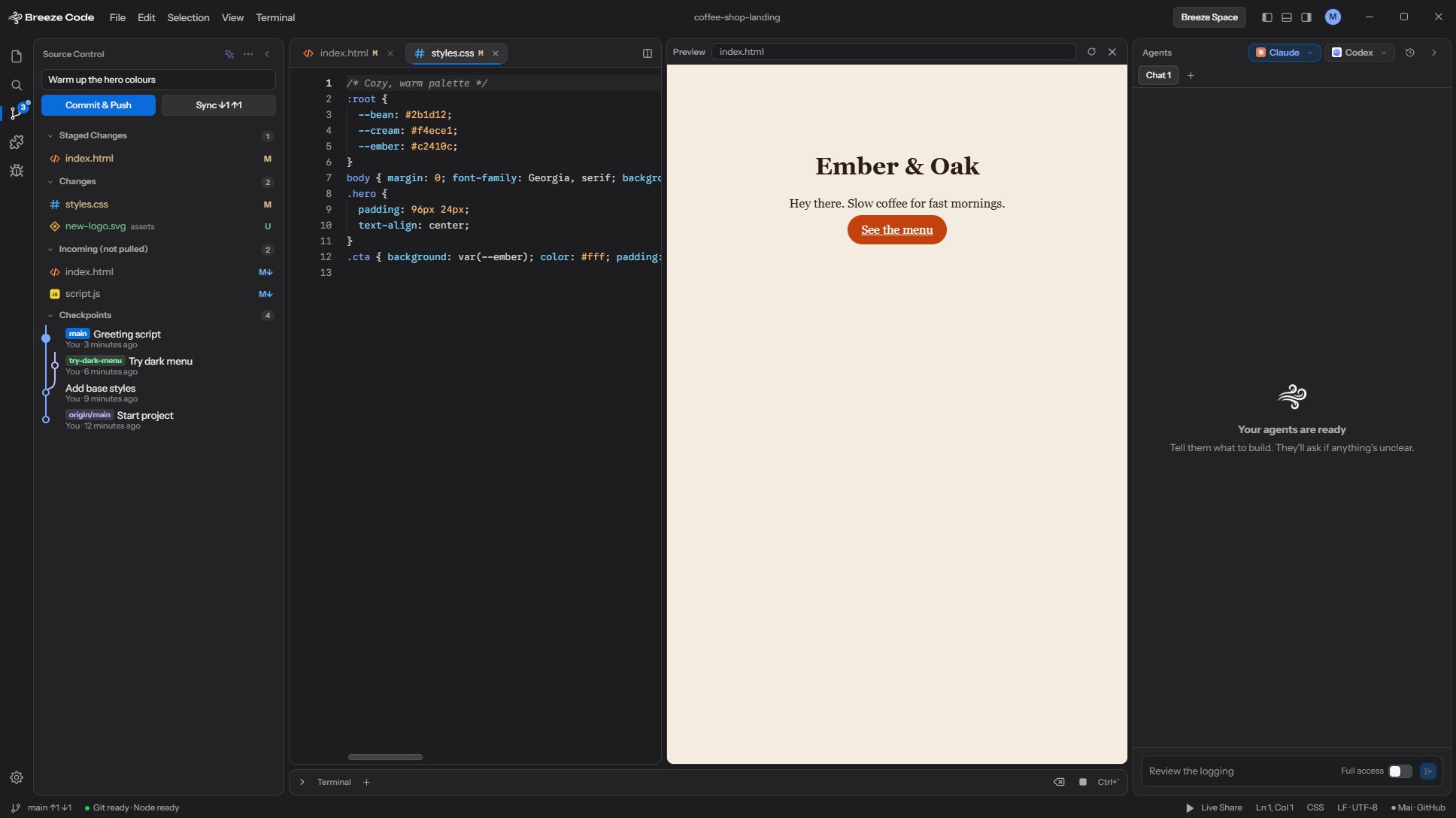
    Source control with staged changes, Commit and Push, and a branch graph of checkpoints
    05 · Ship

    Git and pull requests

    Commit, push, and review GitHub PRs. Conflict Duel puts one agent on each side of a merge conflict.

    06 · Extend

    Plugs into your tools

    MCP servers, skills and plugins you add in Breeze get passed to your agents.

    Get Breeze Code

    Code at blazing speed. Turn ideas into reality.

    Latest version · 112 MB · Windows 10 and 11, 64‑bit